OrcaView
A PyQt6 desktop application for live preview and high-speed recording from the Hamamatsu ORCA-Quest qCMOS camera at up to 19,000+ fps.
Built with
- Python
- PyQt6
- NumPy
- tifffile
- DCAM-SDK4
The problem with camera control software
The Hamamatsu ORCA-Quest qCMOS is a scientific camera capable of capturing frames at extraordinary speeds — over 19,000 fps with frame bundling enabled. The manufacturer supplies a general-purpose GUI, but it is not designed for the tight acquisition loops that neuroscience experiments demand: precise hardware timestamps, configurable ROIs for frame rate optimisation, and raw lossless output at sustained data rates of 2 GB/s or more.
OrcaView was built to fill that gap — a focused application that exposes exactly what a physiologist needs and nothing more.
Live preview and recording as separate concerns
The application separates two distinct use cases.
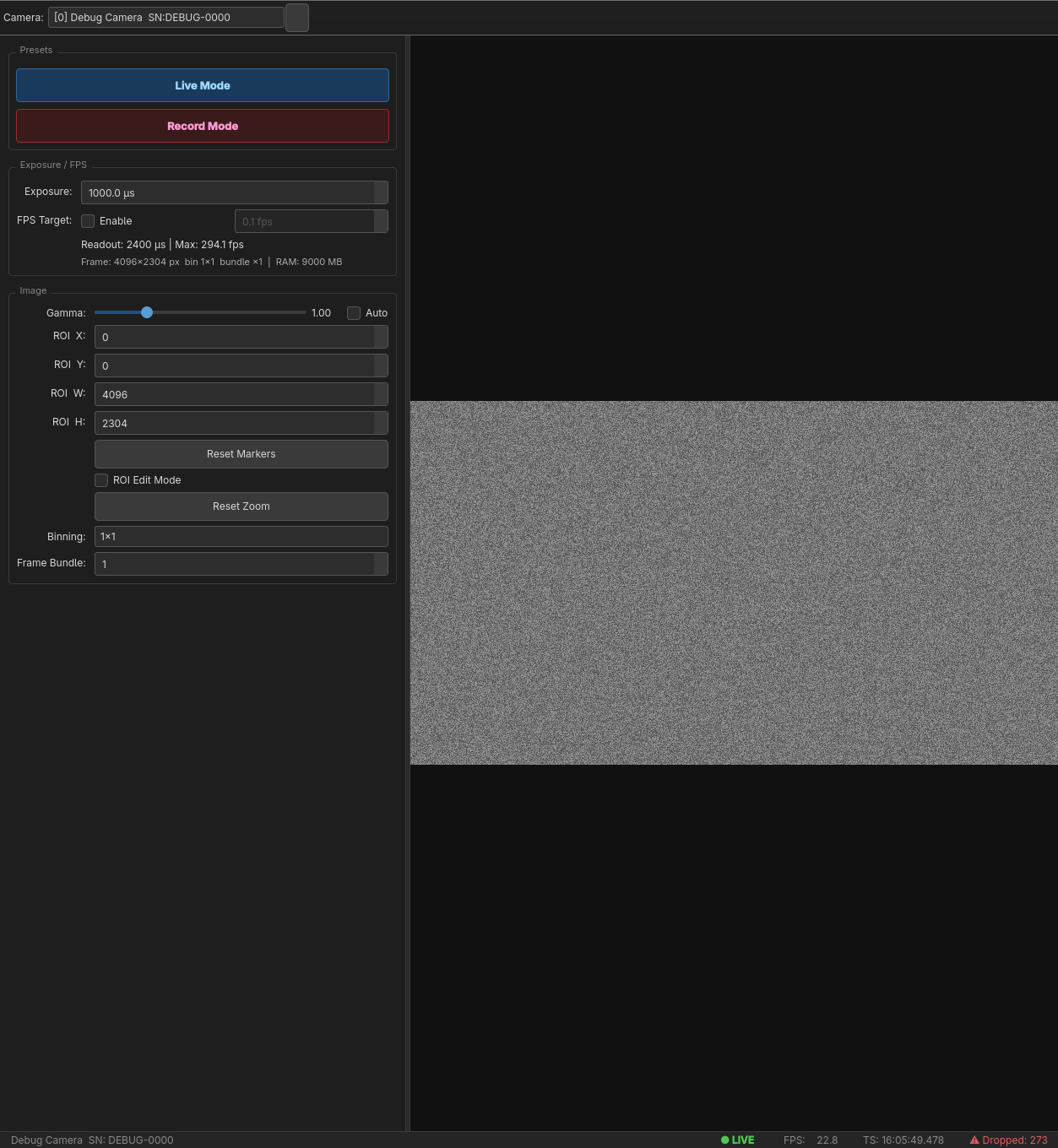
Live mode runs the camera at full sensor resolution (4096 × 2304) at up to 120 fps, showing each frame in a dark-themed viewport. A rolling FPS counter and a live histogram give immediate feedback on exposure and signal quality. The researcher can drag to define an ROI directly on the live image; the camera reconfigures on the fly and the frame rate increases accordingly.
Record mode loads a preset — typically a narrow horizontal strip of the sensor at 4096 × 256 — which lifts the maximum frame rate toward the high-speed regime. A single button starts a timed acquisition; frames stream from the ring buffer to disk as fast as the drive allows. Recording can be stopped early or allowed to run to the configured frame count.
Threading model
Keeping the UI responsive at 1000+ fps requires strict separation between acquisition and everything else.
A dedicated QThread (AcquisitionThread) pulls frames from the DCAM-SDK4
camera handle, stamps each one with both a wall-clock time and the hardware
frame counter, and writes it into a pre-allocated numpy ring buffer. A second
QThread (WriterThread) drains that buffer to disk as raw uint16 binary,
with a small JSON sidecar recording the timestamp array.
The main thread only ever reads from the ring buffer for display — it never touches the camera or the file handle. This means a slow disk write cannot stall the acquisition, and a slow display update cannot drop a recorded frame.
# Writer thread drains the ring buffer in order, pacing itself to disk speed.
def run(self):
    idx = 0
    while not self._stop_event.is_set() or idx < self._frame_count:
        frame, ts = self._ring_buffer.read(idx)
        self._writer.write(frame)
        self._timestamps[idx] = ts
        idx += 1
    np.save(self._ts_path, self._timestamps)
ROI interaction
Selecting a region of interest is the primary way to trade field of view for frame rate. OrcaView renders a blue overlay rectangle on the live image that can be dragged and resized with the mouse. On mouse release, the new ROI dimensions are snapped to the nearest values the camera firmware accepts (multiples of 4 in each axis), applied to the camera, and the FPS readout updates immediately.
The overlay is implemented as a transparent QWidget layered on top of the
live view rather than drawn into the frame itself. This means the display
stays smooth even when the camera is reconfiguring.
Timestamps and data loading
Every recording produces two files: a raw binary stack and a .npy timestamp
array. The timestamp array contains one entry per frame — a tuple of
(wall-clock seconds since epoch, hardware monotonic counter). The monotonic
counter is what matters for synchronisation with external hardware (ephys,
stimulus triggers); the wall-clock entry is useful for aligning sessions across
days.
Example MATLAB and Python snippets for loading the binary stack are included in the repository, since the downstream user is often the experimenter rather than a software engineer.
Hardware interface
OrcaView targets the ORCA-Quest connected via a CoaXPress frame grabber
(Active Silicon, Euresys, or BitFlow). The DCAM-SDK4 layer is abstracted behind
a DCAMCamera class; a DebugCamera mock replaces it during development on
machines without the hardware, emitting synthetic noise frames at the configured
rate. This made iterative GUI work possible without the camera attached.